.png)
How Event Albums Work
Event Albums turn each event you work into another page showing where you worked, what kind of event it was, what you did, and what it looked like.
An Event Album is a set of photos from one event you worked, published as its own page. It's much more than a gallery. Together, your albums make up the Past Events portfolio on your profile, and every photo you give a title becomes a page of its own.
Event Albums are available to Starter, Event Bartender Pro, and Business members.
Why albums matter
Proof of your work
Real weddings, parties, and corporate gigs show clients what hiring you looks like.
Real work in real cities
Each album shows the city where the event happened, so your work is tied to the markets you serve.
Pages that keep adding up
One album per event, and every titled photo, adds another page connected to you.
What one album connects to
One album → a real event → the city where it happened → the type of event → the service you performed → titled photos → a reason to ask for a review → something to share on social → maybe an article → proof for the next client.
Every album page also carries an About the Bartender box, with a button to hire you and a link to your profile.
What clients see
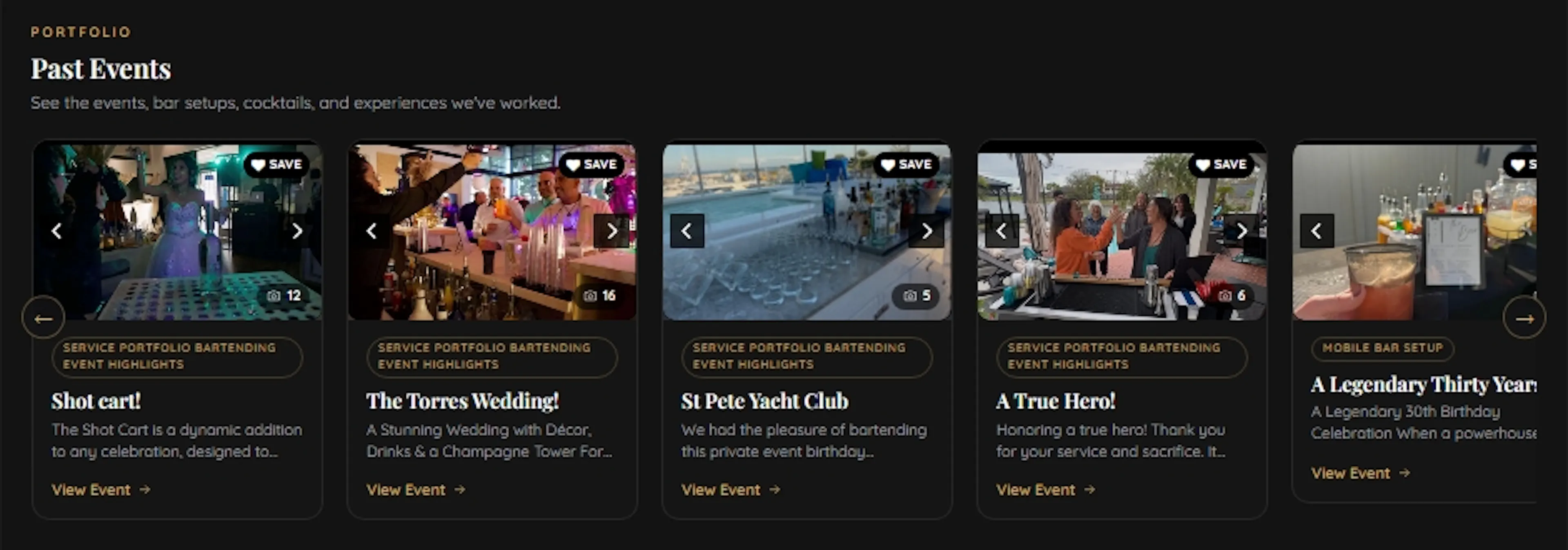
Each card shows the event photo, title, category, a short description, the photo count and a View Event link. Every event you post adds another card to the portfolio.
Each album can include the Event City & State, Venue, event type, service, photos and description. Those details live inside the album itself and help show where you worked and what kind of event you handled.
Worked a wedding in Fort Lauderdale? Post it. Worked a corporate event in Miami the next week? Post that too. Over time, you're showing real work across the markets you actually serve.
What happens when someone opens an Event Album
An Event Album isn't just a photo card on your profile. When someone clicks View Event, they get a full page showing the event in more detail and tying that work back to your business.
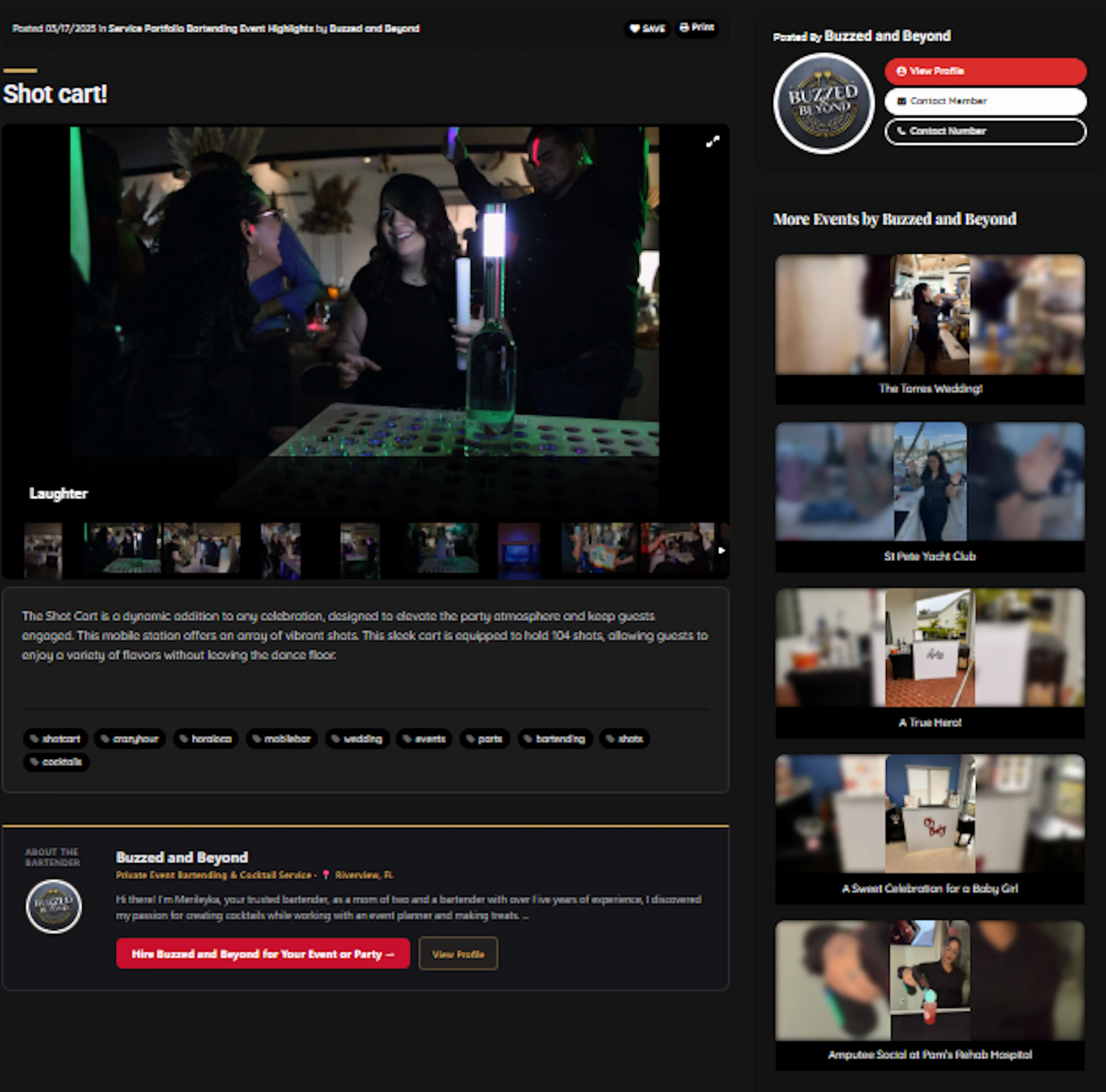
On that page, a client sees the event title, a photo gallery with thumbnails, your description and tags, and your business name, with View Profile, Contact and Hire buttons. Alongside it, More Events shows the rest of your albums.
Profile → Past Events → View Event → the full album → more of your events → contact or hire you.
One event leads into more of your work. A client can open the album, see the event, view more events from you, and contact or hire you from the same experience.
Every Event Album gives you another page you can share, another example a future client can browse, and another piece of real work connected to your name, services and market.
What goes into an album
| Part | What makes it work |
|---|---|
| Album title | It becomes the page title and web address. Name the event, the service, and the city when it fits naturally: "Miami Wedding Reception Bar Service" beats "Event Pics." |
| Category | The type of event, so your portfolio is easy to browse. |
| Event City & State | Where the event took place, like "Charlotte, NC." It shows on the album page. |
| Venue | Optional. Add it if you'd like the venue shown, or leave it blank for private homes. It shows on the album page next to the city. |
| Tags | Up to 10 real terms plus your city, such as "wedding bartender boston." No keyword stuffing. |
| Description | The story of the event: the type of event, about how many guests, your bar setup, the services you provided, and any standout cocktails. |
| Photos | A handful of clean, well-lit, real shots of the bar, the setup, and the night. Lead with your strongest. |
Title every photo
On FindBartenders, every photo is its own page. An album with five titled photos is six pages working for you: the album plus each image. Ten events done this way is 60 pages. Give each photo a title and description that name the event, the service, and the city. A file name like IMG_4821 does nothing for you.
Say where you work. Show it with albums.
| Say it (your profile settings) | Show it (the work you post) | |
|---|---|---|
| Services | Selecting a service says you offer it. | Event Albums, Packages, Experiences, videos and articles show it. |
| Service areas | Adding a city, county or state says you serve it. | Event Albums from events there show you actually worked there. |
Your locations say where you work. Your Event Albums show it. Saying it puts you in the right places. Showing it, one real event at a time, is what proves it.
No event photos yet?
Start with a styled photo shoot: your bar, your signature drinks, and you behind the bar, so someone hiring for a party can see who they'd be hiring. Post it under Cocktail Creations, Mobile Bar Setup or Behind the Scenes, title it honestly as a styled shoot, and post your first real event as soon as you work it. How to do a styled shoot
One album per event
Don't put every photo into a single "My Work" album. Give each event its own album, its own city, its own title, and its own page. That is where your Past Events portfolio gets its strength, one event at a time.
Get started
Post Every Event as an Album
Step by step: post the album, title the photos, ask for the review.
Add an Event Album
Start with your most recent event. A few photos is all it takes.
Member Event Albums
See how other members present their events.
Read the full Platform Guide

Event Albums: Turn Every Event Into Pages That Get Found
The full FindBartenders strategy guide on building albums that bring clients back to your profile.
Previous: Add Photos and Video
Let people see you work.
Next: Post Every Event as an Album
The steps, after every event.
Still need help?
Email support@findbartenders.com and include the email address on your FindBartenders account, plus a short description of what you were trying to do. You can also see every way to reach us on the Contact support page.